# Convert a Proforma Invoice to a Tax Invoice

To convert the invoice of an entity from pro forma to a tax invoice, follow these steps:

**Step 1:**                                                                                                                                                                                                      On the navigation panel, select the "Invoice" option. This will display a list of invoices.

<figure><img src="https://2535826765-files.gitbook.io/~/files/v0/b/gitbook-x-prod.appspot.com/o/spaces%2F-MEMfXeGgsK0w2UmrDtt%2Fuploads%2FeGeStAecoz3QHinMIhef%2FUntitled%20design%20(1).png?alt=media&#x26;token=f67572f5-06f5-4554-8b58-b9a9f75a82b7" alt="" width="563"><figcaption><p>Select the Invoice Option </p></figcaption></figure>

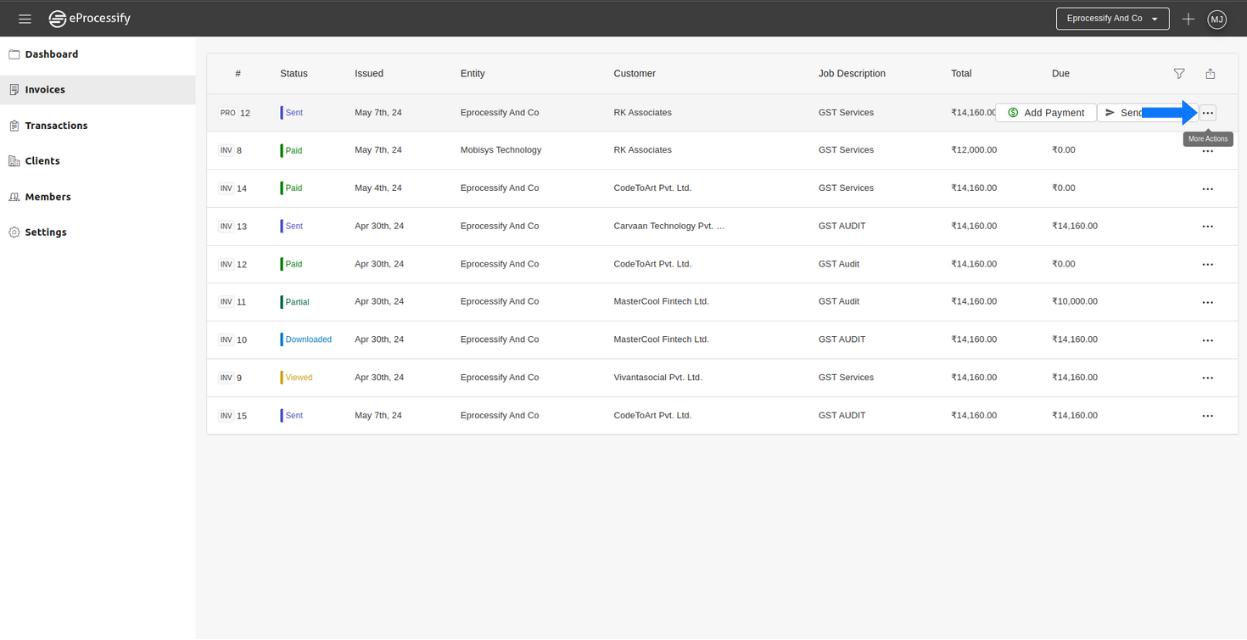
**Step 2:**                                                                                                                                                                                       Choose the pro forma invoice you want to convert to a tax invoice and click on the "More Actions" button located on the right side.

<figure><img src="https://2535826765-files.gitbook.io/~/files/v0/b/gitbook-x-prod.appspot.com/o/spaces%2F-MEMfXeGgsK0w2UmrDtt%2Fuploads%2FVXvoc2mF4vM557pZ8dpb%2F%EF%BF%BC%20-%202024-05-07T124136.044.png?alt=media&#x26;token=063f9d70-35be-40db-82b7-3c64afe2e7f6" alt="" width="563"><figcaption></figcaption></figure>

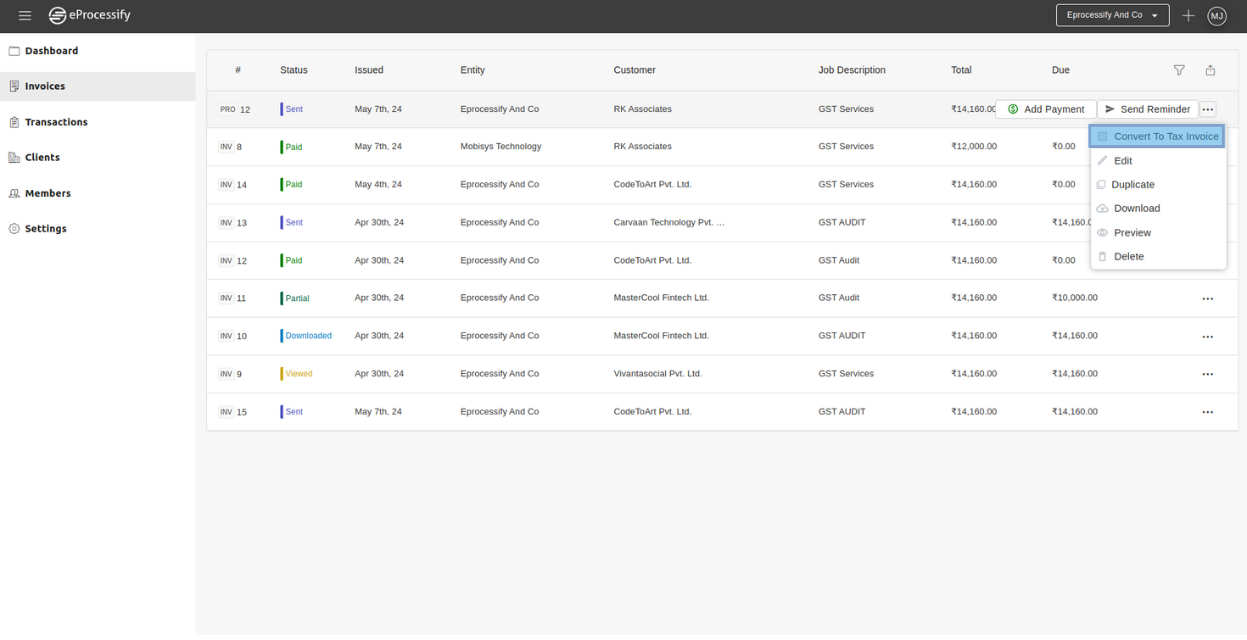
**Step 3:**                                                                                                                                                                                      After clicking on "More Actions," select "Convert to Tax Invoice" from the options that are displayed.

<figure><img src="https://2535826765-files.gitbook.io/~/files/v0/b/gitbook-x-prod.appspot.com/o/spaces%2F-MEMfXeGgsK0w2UmrDtt%2Fuploads%2Fo0G97NPeIyFTCdCASdq4%2F%EF%BF%BC%20-%202024-05-07T124736.531.png?alt=media&#x26;token=c20b6345-698b-4622-898e-6d5f1f31e7e6" alt="" width="563"><figcaption></figcaption></figure>

**Additional Step**                                                                                                                                                                                     You can also convert the pro forma invoice to a tax invoice through your payment page.

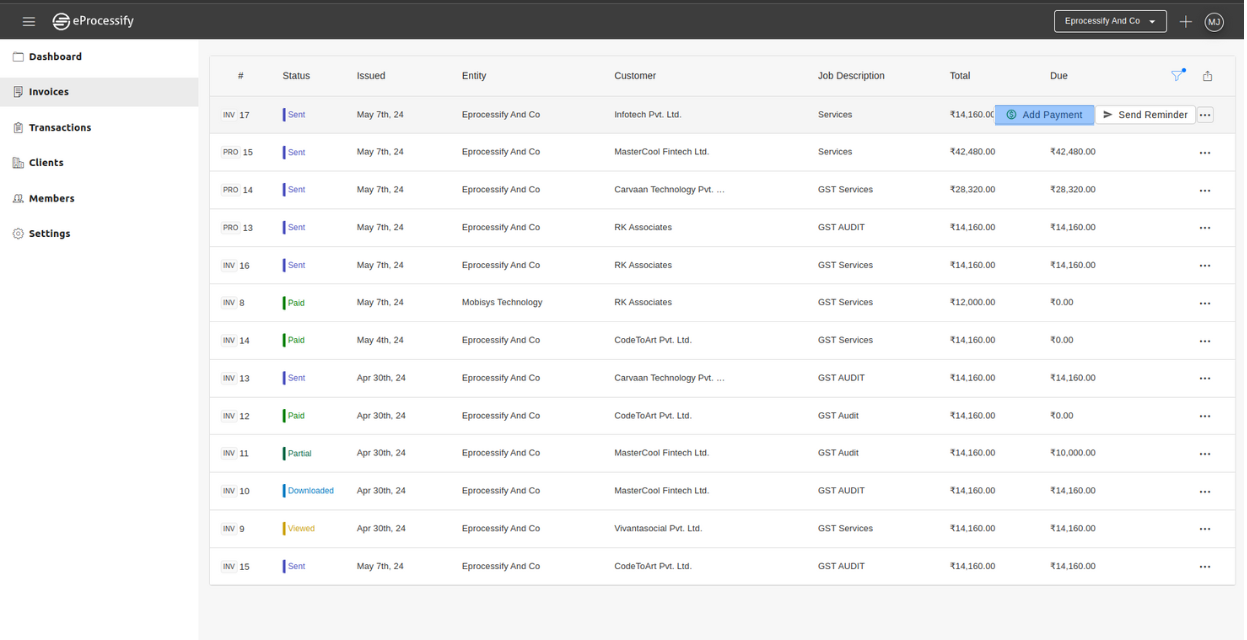
**Step 1:**                                                                                                                                                                        Choose the pro forma invoice that you want to convert into a tax invoice, then proceed by clicking 'add payment'.

<figure><img src="https://2535826765-files.gitbook.io/~/files/v0/b/gitbook-x-prod.appspot.com/o/spaces%2F-MEMfXeGgsK0w2UmrDtt%2Fuploads%2F00y5aqAt8Sug2mYchbX1%2F%EF%BF%BC%20-%202024-05-07T184343.220.png?alt=media&#x26;token=05475ddf-c132-4a18-941e-edeb82fbea34" alt="" width="563"><figcaption></figcaption></figure>

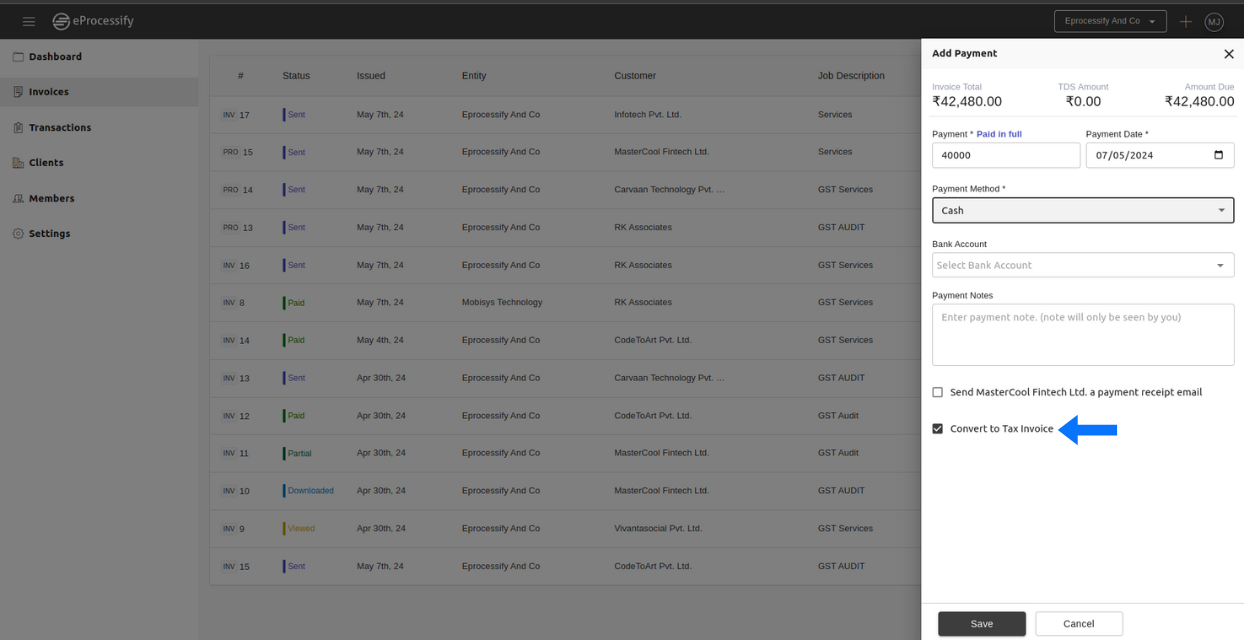
**Step 2:**                                                                                                                                                                                       Afterwards, enter the payment details according to your specifications, then select the 'Send Tax Invoice' checkbox to convert the pro forma invoice into a tax invoice and save it.

<figure><img src="https://2535826765-files.gitbook.io/~/files/v0/b/gitbook-x-prod.appspot.com/o/spaces%2F-MEMfXeGgsK0w2UmrDtt%2Fuploads%2FpA90tDnqtw99jmb7JAP9%2F%EF%BF%BC%20-%202024-05-07T184920.134.png?alt=media&#x26;token=e0c06b51-1530-4c12-9f6d-c50df71f3b19" alt="" width="563"><figcaption></figcaption></figure>

And this is how you can convert a pro forma invoice into a tax invoice on eProcessify.